
NHS ESSEX CVD PROGRAMME
LIPIDS INITIATE & OPTIMISE
PATHWAYS
PCN-led user guide
A practical guide for PCNs and participating GP practices using Eclipse to identify, prioritise, engage and review patients across the bespoke CVD Lipids Initiate and Lipids Optimise pathways.
Prepared for operational use across PCNs and GP practices in NHS Essex.

01
Access pathways
Log in to Eclipse and open the two lipids lists.
02
Prioritise patients
Use priority views, sorting and filters to focus effort.
03
Engage locally
Contact patients through agreed PCN or practice routes.

04
Record outcomes
Review, code, prescribe or follow up in local systems.
What this guide covers
o How to access the bespoke Lipids Initiate and Lipids Optimise pathways in Eclipse
o How to understand priority groups and the information icons that explain eligibility
o How PCNs and GP practices can prioritise patients using filters, lists and SMURF review
o How to manage local patient engagement under the PCN-led model
o What to review and record when outcomes are achieved
Operational note
This guide supports operational use of Eclipse for the Lipids Initiate and Lipids Optimise pathways. It does not replace local clinical protocols, professional judgement, NICE guidance or agreed PCN/GP clinical governance processes.
Eclipse Overview
ECLIPSE (Equality of Care Led Insights for Patient Safety & Engagement) is the NHS-assured digital population health and patient engagement platform provided by Prescribing Services Ltd. Within the NHS Essex Cardiovascular Disease (CVD) programme, Eclipse supports PCNs and GP practices to identify, prioritise, engage and review patients who may benefit from improved lipid management.
The Lipids Initiate and Lipids Optimise pathways bring together GP clinical system data, risk stratification, priority grouping, dynamic patient monitoring and engagement outputs, helping local teams focus on modifiable cardiovascular risk factors and health inequalities priorities.
Eclipse services have gained central NHS assurance status, form part of the GPIT Futures framework, and are supported by NHS central funding. Prescribing Services Ltd acts as a secure processor of patient data and provides a platform and support service to help improve prescribing safety, patient outcomes, practice efficiency and reduce unwarranted variation in care.
For access to patient identifiable details (PID), use Eclipse via https://secure.nhspathways.org when using a secure network such as HSCN/N3.
For access to non-PID, use Eclipse via www.nhspathways.org
1. Logging in to Eclipse
a. Log in to Eclipse via https://secure.nhspathways.org/ and complete the two-factor authentication steps. If you have any login issues, please contact the support team at support@prescribingservices.org.
b.Enter your username and password
You will have received your username via an email from the Eclipse support help desk
c.Select Sign In

d. Request your passcode via Email or SMS*
*By default the code will be sent to you NHS email, unless a phone number was provided at the later stage. You can also update your information within the system.

e.Check your Email (or Phone) for a 6-digit passcode.

f. Enter the passcode.
g. Select Enter Site.

2. Finding the lipids pathways
Within your Eclipse home page, select the MSE CVD icon and open the Lipids Initiate and Lipids Optimise pathways. These pathways support PCNs and GP practices to identify patients who may benefit from lipid-lowering therapy, updated cardiovascular risk assessment, adherence review, treatment optimisation, or coding of an appropriate exclusion.
a. Select MSE CVD.
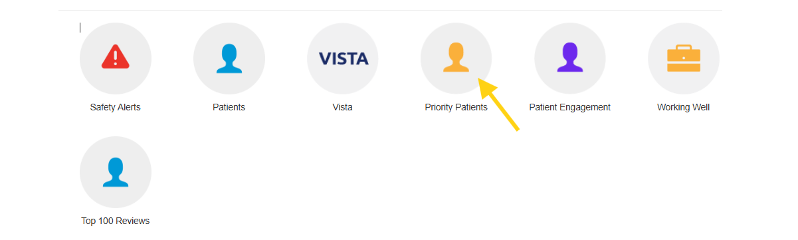
a. Each pathway opens to the same style of interface tailored for organising each cohort depending on the goals of the pathway. Click Priority Patients to view lists representing different populations within the patient cohort that may benefit from programme actions.
Information icons in priority groups
a. Click View to open a list of individual patients in a cohort category.
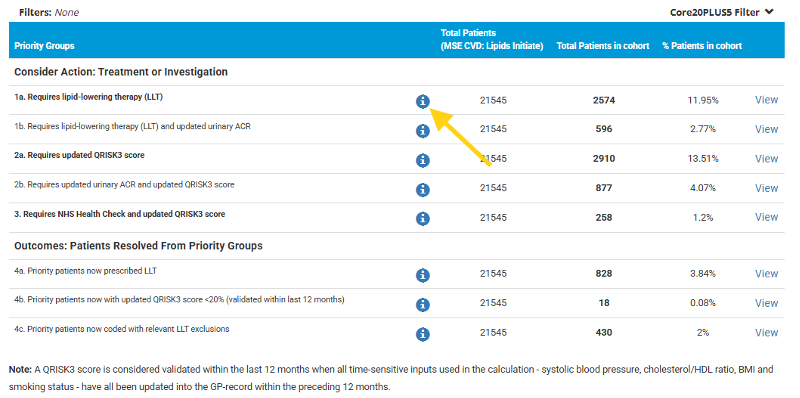
1a. Requires lipid-lowering therapy (LLT) - Patients aged >=40, with an indicative QRISK3 score of >=20% validated within the last 12 months, who are not on lipid-lowering therapy (LLT), have no relevant coded LLT exclusion or contraindication, and have no recorded CKD stage 3+.
1b. Requires lipid-lowering therapy (LLT) and updated urinary ACR - Patients aged >=40, with an indicative QRISK3 score of >=20% validated within the last 12 months, who are not on LLT, have no relevant coded LLT exclusion or contraindication, and have CKD stage 3+ with no urinary ACR recorded in the last 12 months.
2a. Requires updated QRISK3 score - Patients aged >=40, with an indicative QRISK3 score of >=40%, whose QRISK3 score is not validated within the last 12 months, who are not eligible for an NHS Health Check, and who have no recorded CKD stage 3+.
2b. Requires updated QRISK3 score and updated urinary ACR - Patients aged >=40, with an indicative QRISK3 score of >=40%, whose QRISK3 score is not validated within the last 12 months, who are not eligible for an NHS Health Check, and who have CKD stage 3+ with no urinary ACR recorded in the last 12 months.
3. Requires NHS Health Check and updated QRISK3 score - Patients aged >=40, with an indicative QRISK3 score of >=40%, whose QRISK3 score is not validated within the last 12 months, and who are eligible for an NHS Health Check.
4a. Priority patients now prescribed LLT - Patients previously in groups 1a or 1b who have now been issued an active lipid-lowering therapy (LLT) prescription after review.
4b. Priority patients now with updated QRISK3 score <20% (validated within last 12 months) - Patients previously in groups 2a, 2b or 3 who now have an updated indicative QRISK3 score of <20% that is validated within the last 12 months.
4c. Priority patients now coded with relevant LLT exclusions - Patients previously in groups 1a or 1b who are now coded with a relevant reason why lipid-lowering therapy is not being prescribed, including declined, not tolerated, contraindicated, or another agreed exclusion code.
Note: A QRISK3 score is considered validated within the last 12 months when all time-sensitive inputs used in the calculation - systolic blood pressure, cholesterol/HDL ratio, BMI and smoking status - have all been updated into the GP-record within the preceding 12 months.
5. Lipids Optimise priority groups
Lipids Optimise supports secondary prevention. It identifies patients aged 20-80 years inclusive with established cardiovascular disease who may require adherence review, treatment restart, treatment optimisation, or coding of a relevant LLT exclusion.
a. Click View to open a list of individual patients in a cohort category.
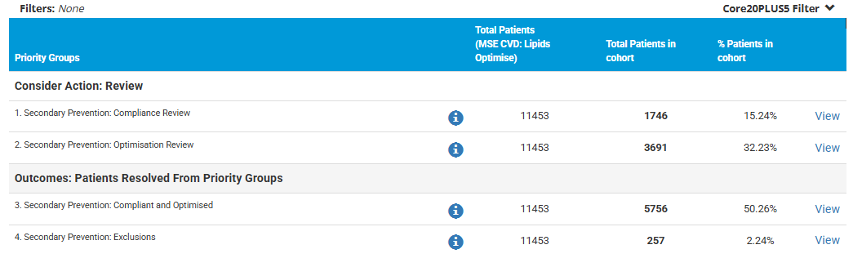
1. Secondary Prevention: Compliance Review - Patients aged 20-80 years inclusive, with secondary prevention indicated due to recorded ischaemic heart disease, stroke for QOF, or peripheral arterial disease for QOF, who have had no LLT pickup in the last 90 days and have no relevant coded LLT exclusion or contraindication.
2. Secondary Prevention: Optimisation Review - Patients aged 20-80 years inclusive, with secondary prevention indicated, who have picked up LLT in the last 90 days and whose last recorded LDL is >2.0 mmol/L or non-HDL cholesterol is >2.6 mmol/L.
3. Secondary Prevention: Compliant and Optimised - Patients aged 20-80 years inclusive, with secondary prevention indicated, who have picked up LLT in the last 90 days and whose last recorded LDL is <=2.0 mmol/L and non-HDL cholesterol is <=2.6 mmol/L.
4. Secondary Prevention: Exclusions - Patients aged 20-80 years inclusive, with secondary prevention indicated, who now have a relevant coded LLT exclusion, including contraindication, recent pregnancy, or LLT decline codes.
6. Working with patient lists
By clicking View on any priority group, Eclipse opens the patient list for that group. The list can be used to understand the patient cohort, focus activity and support review. Users can scroll horizontally to view clinical parameters and can select blue column headers to reorder patients by relevant fields.
a. Each column on the patient grid can be ordered based on the criteria in the header.
The patient grid:
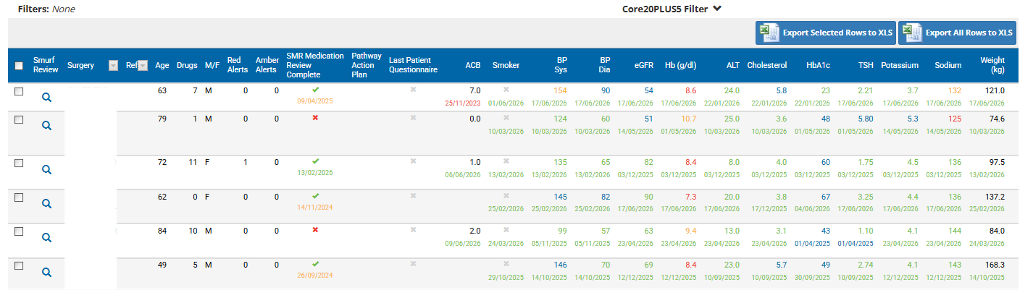
Selecting the magnifying glass icon will open the patient’s profile (SMURF) where you can review the patient’s medical overview, view their personal information, and take relevant programme actions.
Use the Core20PLUS5 and demographic filters to create more targeted working lists. These filters can support local health inequalities priorities by helping teams focus on factors such as deprivation, age, ethnicity, gender and more relevant clinical conditions.
At the top right of the grid you will find an export to excel feature, if this is a preferred view of your patient list.
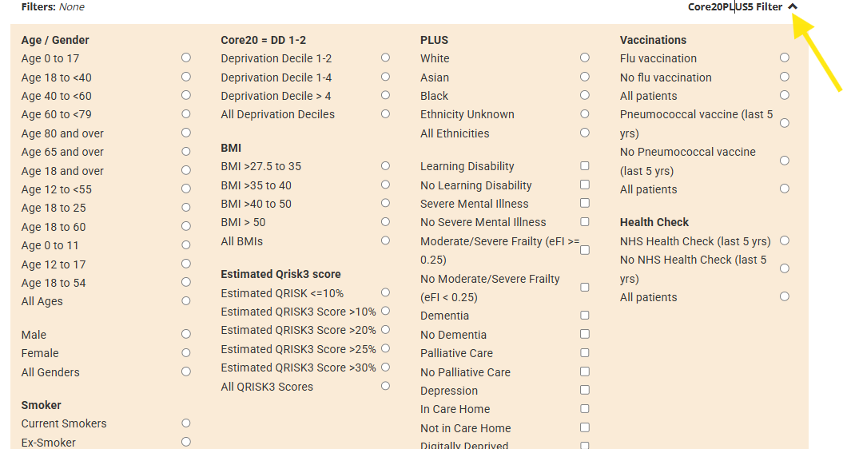
Individual patient profile (SMURF)
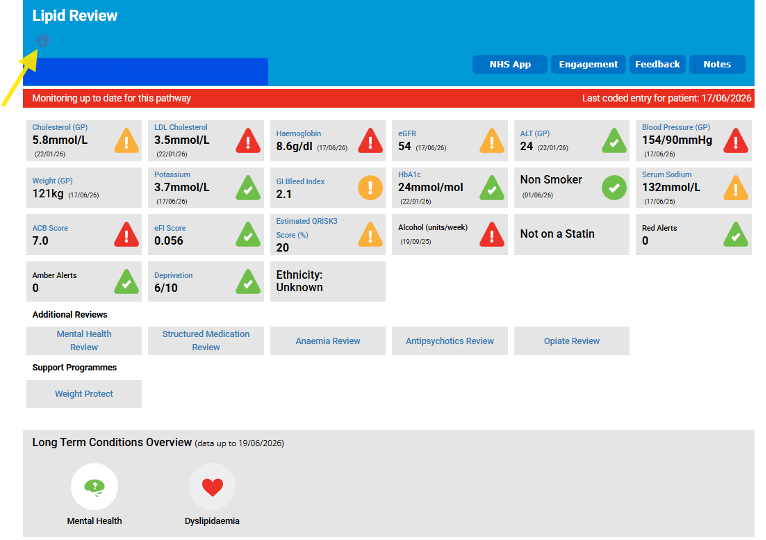
You can also view a patient's individual data summary in their SMURF (Structured Medication Use and Review Framework) page. To open it, click the magnifying glass icon next to the patient's row in your list.

Magnifying glass to view the patient’s SMURF
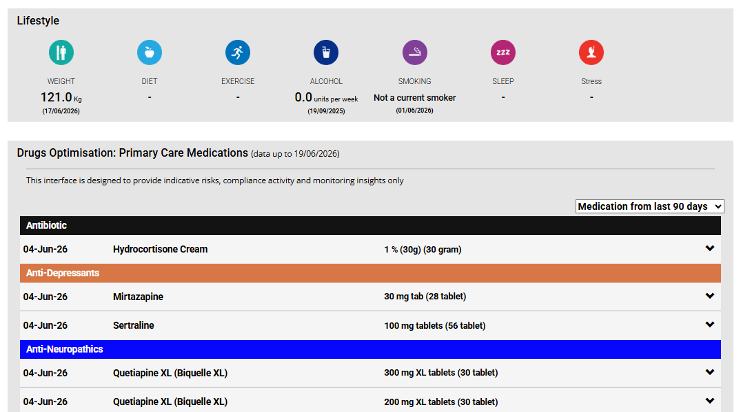
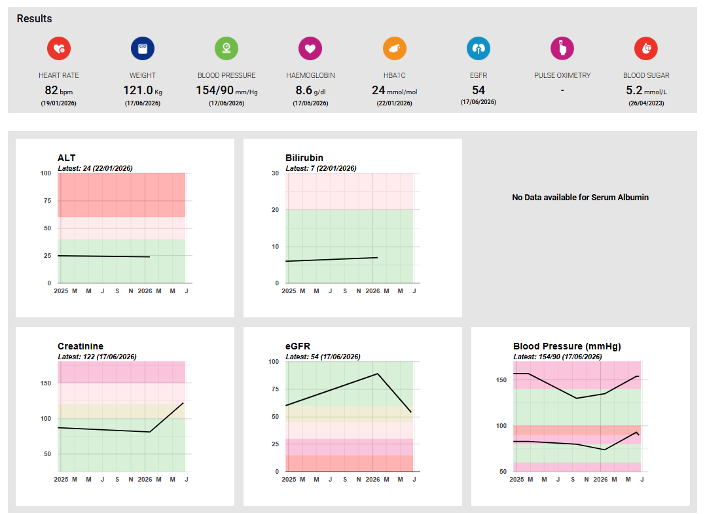
The SMURF brings together relevant clinical information in one place, including current and historical medicines, lipid results, QRISK3-related inputs, alerts and more. It integrates multiple data sources to give a picture of the patient's current health status, including GP record data, current and historical medications, and hospital data is available for the patient, recent admissions activity is also shown.
The information displayed in the nodes at the top of the page is pathway-specific: it reflects the pathway you are currently working within, giving you a focused overview for that review. If the patient is enrolled in other relevant pathways, a row of review types is shown above or below the nodes. Selecting a different review type updates the nodes so they reflect that pathway's clinical context.
The SMURF also surfaces outstanding RADAR alerts relevant to their care. RADAR (Risk Assessment and Drug Alert Review) is Eclipse’s automated alert system. Prescribing-related RADAR alerts are embedded within the medications view, and the issue history can be reviewed to help identify potential compliance issues.
7. PCN-led patient engagement
In the PCN-led model, the PCN or participating GP practices lead patient contact, education, review and follow-up locally. Eclipse provides the Lipids Initiate and Lipids Optimise pathways, priority groups, patient lists and outcome reporting to support delivery.
| Step | PCN-led action | Eclipse support |
|---|---|---|
| 1 |
Select cohort Choose which Lipids Initiate or Optimise priority groups to work through first based on capacity and local priorities. |
Priority Patients view, cohort counts, filters and patient lists. |
| 2 |
Prioritise Use clinical and demographic columns to refine the working list before outreach. |
Core20PLUS5 filters, sortable columns and SMURF review. |
| 3 |
Engage locally Contact patients using local PCN or practice processes such as SMS, phone, letter, clinic invitation or existing recall routes. |
Patient-facing programme information links can be used locally if appropriate (see note below). |
| 4 |
Review and record Review the patient’s record and clinical context in Eclipse and in your local clinical system, then record relevant results, codes, prescriptions, exclusions or follow-up actions as appropriate. |
Outcome groups in Eclipse show movement after records are updated in the GP system. |
Once you have selected your target cohort, you can begin contacting patients. When logged into the secure network (secure.nhspathways.org), patient-identifiable information, including contact details, will be visible within the patient list and at the top of their SMURF under the “i” icon.
Public Information Pages for Pathways
Lipids Initiate - https://nhsconnect.org/projectinfo/mse-cvd-lipids-initiate.html
Lipids Optimise - https://nhsconnect.org/projectinfo/mse-cvd-lipids-optimise.html
Please note that the above links are provided as part of the PEGASUS-led engagement model. Eclipse users working under the PCN-led model, where patients are not enrolled via PEGASUS, may still view the public-facing lander page content. However, any onward links from the lander page to the patient portal or secure questionnaires are only intended for patients registered with PCNs or GP practices that are signed up to the PEGASUS workflow. Patients managed through the PCN-led model will not be able to fully access or complete these portal-based questionnaires.
Suggested local review approach
Review each patient within the relevant priority group and confirm the clinical context before action.
For Lipids Initiate groups 1a and 1b, consider whether the patient may benefit from LLT discussion or prescribing, subject to local clinical process.
For Lipids Initiate groups 2a, 2b and 3, consider the outstanding QRISK3 inputs, NHS Health Check status and urinary ACR requirement where relevant.
For Lipids Optimise group 1, review LLT pickup/compliance and consider adherence, restart or alternative treatment discussions.
For Lipids Optimise group 2, review lipid targets and consider treatment and lifestyle optimisation in line with local protocol.
Where LLT is declined, not tolerated, contraindicated or otherwise not appropriate, ensure the agreed code is added to the GP clinical record where relevant.
8. Recording outcomes and clinical responsibility
Eclipse supports identification, prioritisation and review. It does not replace clinical review or clinical judgement. PCNs and GP practices retain responsibility for diagnosis, coding, prescribing, treatment decisions and follow-up throughout participation in the programme.
| Outcome | How it may appear in Eclipse | Local responsibility |
|---|---|---|
| LLT started |
Lipids Initiate patients may move to priority group 4a once an active LLT prescription is recorded in GP data |
Confirm clinical appropriateness, prescribe and code in the GP record. |
| Indicative QRISK3 updated and now <20% |
Lipids Initiate patients may move to priority group 4b once updated inputs validate a QRISK3 score <20%. |
Record updated risk factor data and confirm risk assessment result. |
| LLT exclusion coded |
Initiate or Optimise patients may move to exclusion outcome priority groups once relevant codes are recorded in GP data. |
Ensure the code reflects the clinical decision and patient discussion. |
| Secondary prevention compliant/optimised |
Optimise patients may move to priority group 3 when LLT pickup and lipid results meet the pathway criteria. |
Review against local clinical standards and continue follow-up as required. |
9. Programme administration and support
PCNs should refer to the programme proforma for details of the implementation model, participating practices, permissions confirmed, and the selected engagement approach for your PCN. The proforma is the key administrative record for your PCN’s participation in the programme.
Programme proforma: https://www.prescribingservices.org/mse-cvd-lipids-initiate-and-optimise-pcn-pro-forma
FAQs document: A frequently asked questions document covering common programme and pathway queries has been provided by NHS Essex ICB. This should be your first reference point for programme-level questions not covered in this guide. Please ask your PCN lead or programme contact for the current version if you do not have it.
Recorded training session: A recorded training meeting delivered by the Eclipse team in June 2026 is available and covers a walkthrough of the Eclipse platform and the Lipids pathways. Contact the Eclipse Training Lead (details below) for access to the recording.
Support Routes
Eclipse support: support@prescribingservices.org | 01553 615555
Eclipse Programme Lead: glen.munday@puttingpatientsfirst.org.uk
Eclipse Training Lead: paul@prescribingservices.org
Tutorial Complete!
b. The programme contains multiple pathways. Click View to access the pathway of your choosing.

Cohort summaries
| Pathway | Prevention focus | Broad Cohort | Core purpose |
|---|---|---|---|
| MSE CVD: Lipids Initiate | Primary prevention | Patients aged >=40 with no recorded cardiovascular disease who may require LLT or an updated cardiovascular risk assessment. | Identify patients who may need LLT, updated QRISK3 parameters, urinary ACR or NHS Health Check activity. |
| MSE CVD: Lipids Optimise | Secondary prevention | Patients aged 20-80 inclusive with established cardiovascular disease, including IHD, stroke for QOF or PAD for QOF. | Identify patients who may require adherence/compliance review, treatment restart, treatment optimisation or relevant LLT exclusion coding. |
Programme exclusions
Patients receiving palliative or end-of-life care, care home residents and patients with severe frailty are excluded from the programme. The Optimise pathway also excludes patients with pregnancy recorded in the last 12 months.
3. Finding the lipids pathways
By clicking View on the far-right side of the pathway row, users will see a series of pathway icons. The Priority Patients icon is the main operational area for PCN-led work and is also useful in PEGASUS-led work for high-level tracking.
What is PEGASUS?
PEGASUS is a separate, centrally-coordinated patient engagement model also available within the MSE CVD programme, in which patients are contacted and enrolled through a managed outreach service. If your PCN is operating under the PCN-led model (as described in this guide), PEGASUS does not apply to you for this programme. Where this guide mentions PEGASUS, it is simply to help you understand the distinction.
The Priority Patients tables include information icons (shown as ⓘ). These appear next to the priority group name in Eclipse. When you click an icon, Eclipse displays the explanation for how patients are eligible for that group. Reviewing these icon descriptors before starting outreach will help you understand why patients appear in each group.
4. Lipids Initiate priority groups
Lipids Initiate supports primary prevention. It identifies patients aged 40 and over without recorded cardiovascular disease who may benefit from lipid-lowering therapy or an updated cardiovascular risk assessment. The pathway separates patients into action groups and outcome groups.